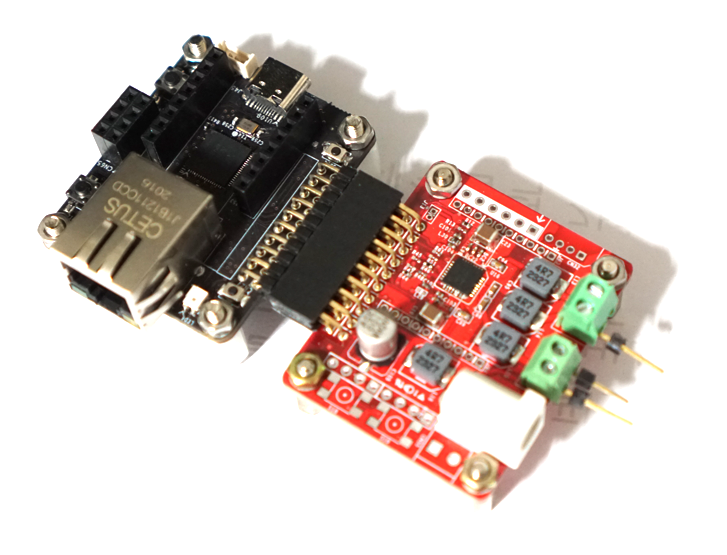
4032표준 핀맵으로 제작된 오디오 앰프는 여러 시리즈가 있지만 이번에는 좀더 출력이 큰 TAS5825P 모듈로 테스트 해보자
TAS5825P는TI사의 하이브리드-프로(Hybrid-Pro) 알고리즘 기반의 고효율 디지털 입력 클래스 D(Class-D) 오디오 증폭기 이다. 스테레오로 구동시 최대 38 W (8-Ω, 24 V, THD+N=10%), 모노 65W 급으로 네트웍 스피커로는 딱좋은 솔루션이 될수 있을것 같다.
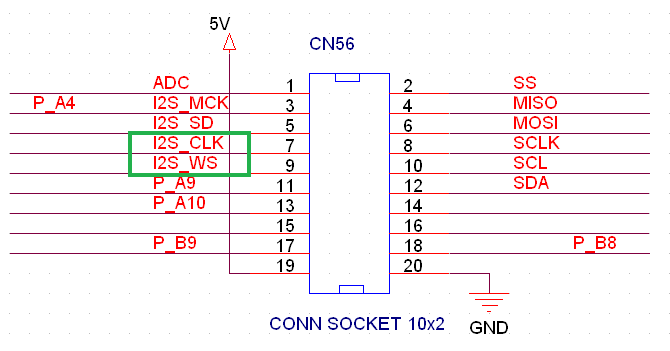
4032 표준 핀맵 20핀 커넥터는 5, 7 , 9번 핀에 I2S 핀맵이 할당되어 있다.
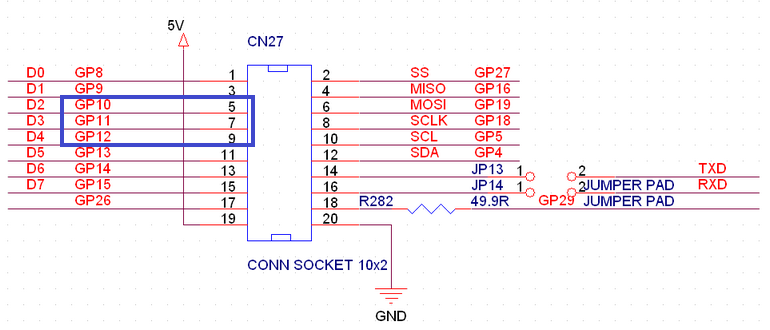
이에 맞게 [W55RP20-4032] 보드는 표준 핀맵의 20핀 커넥터에 GP10 ~ GP 12가 I2S 핀맵으로 할당되어 있다.
I2S 핀맵 설정 및 I2C 초기화 코드 추가
#include <Wire.h>
#include <I2S.h>
#include "audio_data2.h"


#define I2S_DATA_PIN 10
#define I2S_CK_PIN 11
#define I2S_WS_PIN 12

void setup() {
  Serial.begin(115200);
  while (!Serial) {
   // wait for serial port to connect. Needed for Leonardo only
  }

  Serial.println("Starting TAS5825P");

  i2s.setDATA(I2S_DATA_PIN);
  i2s.setBCLK(I2S_CK_PIN);

  if (!i2s.begin(SAMPLE_RATE)) {
    Serial.println("I2S Initialization Failed!");
    while (true);
  }

  for (int i = 0; i < (SAMPLE_RATE / 20); i++) {
    i2s.write((int32_t)0); // Left 무음
    i2s.write((int32_t)0); // Right 무음
  }

  delay(10);

  // I2C 초기화
  Wire.begin();
  Wire.setClock(100000);
  initTAS5825P();
  Serial.println("Starting WAV File Output...");
}
TAS5825는 I2C 로 각종 설정및 내장 DSP 튜닝값을 업데이트 해야 하므로 GP4, GP5에 할당된 I2C를 사용해야 한다.
실제 튜팅은 TI PurePath Console에서 추출한 헤더 파일을 넣어주어야 하지만 일단 간단히 동작 테스트를 위해 WHO AM I 레지스터를 읽어 보자.
#include <I2S.h>

void tas5825p_write_reg(uint8_t reg, uint8_t value) {
  Wire.beginTransmission(TAS5825P_ADDR);
  Wire.write(reg);
  Wire.write(value);
  Wire.endTransmission();
}

bool checkTAS5825P() {
  Serial.println("TAS5825P Connection Check Started...");

  // DIE_ID (WHO AM I) 레지스터 읽기 (0x67)
  Wire.beginTransmission(TAS5825P_ADDR);
  Wire.write(0x67);
  Wire.endTransmission(false);

  Wire.requestFrom(TAS5825P_ADDR, 1);
  if (Wire.available()) {
    byte dieId = Wire.read();
    Serial.print("Device DIE_ID (Reg 0x67): 0x");
    Serial.println(dieId, HEX);

    if (dieId == 0x00 || dieId == 0xFF) {
      Serial.println("TAS5827P ID Error");
      return false;
    }
  } else {
    return false;
  }

  Serial.println("TAS5827 Connection Success!\n");
  return true;
}


// -------------------------
// 2. TAS5825P 초기화 함수
// -------------------------
void initTAS5825P() {
  tas5825p_write_reg(0x03, 0x3)

  Serial.println("TAS5825P I2C Init Completed (Play Mode).");
}
테스트 결과 문제 없이 I2C로 설정이 되는 것을 확인 할 수 있다.
이제 WAV 파일을 출력 해 보도록 하자.
44.1khz WAV 파일을 배열로 저장해서 출력력 하도록 했다.
void loop() {
  if (current_index < wav_array_len - 3) {

    //왼쪽 채널 (16비트) 읽기
    int16_t sample16_L = wav_array[current_index] | (wav_array[current_index + 1] << 8);

    //오른쪽 채널 (16비트) 읽기 (인덱스를 2칸 더 밀어서 읽음)
    int16_t sample16_R = wav_array[current_index + 2] | (wav_array[current_index + 3] << 8);

    //볼륨 조절
    sample16_L = (int16_t)(sample16_L * volume);
    sample16_R = (int16_t)(sample16_R * volume);

    int32_t sample32_L = ((int32_t)sample16_L) << 16;
    int32_t sample32_R = ((int32_t)sample16_R) << 16;

    //I2S 전송
    i2s.write((int32_t)sample32_L); // Left
    i2s.write((int32_t)sample32_R); // Right

    current_index += 4;

  } else {
    // 재생이 끝나면 무음(0) 출력
    i2s.write((int32_t)0);
    i2s.write((int32_t)0);

	//다시 재생
    current_index = 0;
  }
}
W55RP20 I2S 로 TAS5825P 에 WAV 파일 출력 테스트 동영상
참고로 MAX97358 AMP 테스트와 비교해 보면 음질 차이를 느낄 수 있다.


