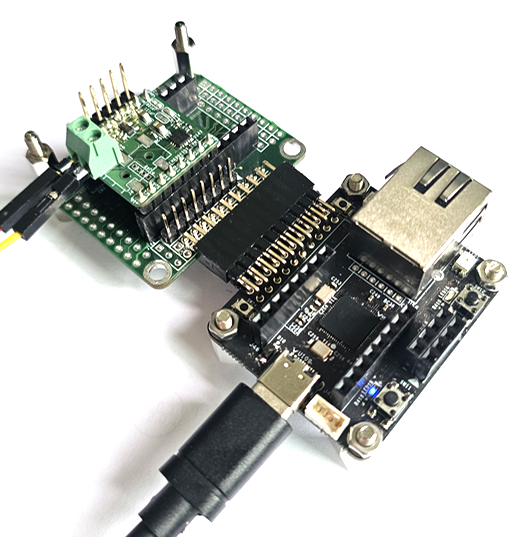
W55RP20 을이용하여 네트웍 스피커를 제작하기 위해 I2S Aduio AMP로 출력 테스트를 해 보자
우선 예전에 제작해 두었던 MAX98357 EVM 보드를 이용해 RP2040의 I2S 출력 테스트를 할수 있는 코드를 작성하자
#include <I2S.h>
#include <math.h>

// 1. 핀 정의
#define BUTTON_PIN    2   // 스위치 연결 핀 (GP2)
#define LED_PORT          8
#define Led1On()          digitalWrite(LED_PORT, 1)
#define Led1Off()         digitalWrite(LED_PORT, 0)

#define I2S_DATA_PIN 10
#define I2S_CK_PIN   11   // BCLK
#define I2S_WS_PIN   12   // LRCLK (자동으로 BCLK + 1 설정됨)

I2S i2s(OUTPUT);

// 2. 오디오 및 사이렌 설정
const int sampleRate = 44100;
const int amplitude = 12000;  // 볼륨

// 사이렌 주파수 범위 (600Hz ~ 1200Hz 사이를 오르내림)
const float minFreq = 600.0;
const float maxFreq = 1200.0;
float currentFreq = minFreq;
bool rising = true;

const float freqStep = (maxFreq - minFreq) / (sampleRate * 1.0);

float phase = 0.0;
int volumePercent = 20;

void setup() {
  pinMode(BUTTON_PIN, INPUT_PULLUP);
  pinMode(LED_PORT, OUTPUT);
  Led1Off();

  // I2S 설정
  i2s.setDATA(I2S_DATA_PIN);
  i2s.setBCLK(I2S_CK_PIN);
  i2s.setBitsPerSample(16);

  if (!i2s.begin(sampleRate)) {

  }
}

void loop() {
  // 스위치가 눌렸는지 확인 (LOW = 눌림)
  if (digitalRead(BUTTON_PIN) == LOW) {

    Led1On();
    // 1. 사이렌 주파수 계산 (오르락내리락)
    if (rising) {
      currentFreq += freqStep;
      if (currentFreq >= maxFreq) {
        currentFreq = maxFreq;
        rising = false;
      }
    } else {
      currentFreq -= freqStep;
      if (currentFreq <= minFreq) {
        currentFreq = minFreq;
        rising = true;
      }
    }

    float rawSample = sin(phase) * 32767;

    float volumeScale = volumePercent / 100.0;
    int16_t finalSample = (int16_t)(rawSample * volumeScale);

    i2s.write16(finalSample, finalSample);
  } else {
    Led1Off();
    i2s.write16(0, 0);
  }
}
테스트 결과 사인파 출력이 정상적으로 되는 것을 확인 할 수 있다.
간단히 WAV 파일 출력 테스트를 해 보면 음성파일이 잘 출력 되는것을 확인 할 수 있다.
#include <I2S.h>

#define BUTTON_PIN    2
#define I2S_DATA_PIN 10
#define I2S_CK_PIN   11   // BCLK
#define I2S_WS_PIN   12   // LRCLK

//max98357a
I2S i2s(OUTPUT);

// 44100Hz로 변환된 WAV 데이터 배열
const uint8_t wav_array[] = {
  0x52, 0x49, 0x46, 0x46, 0x00, 0x00, 0x00, 0x00, // RIFF 헤더...
  // ... 데이터 ...
};

const uint32_t wav_size = sizeof(wav_array);


const int sampleRate = 44100;

void setup() {
  pinMode(BUTTON_PIN, INPUT_PULLUP);

  i2s.setDATA(I2S_DATA_PIN);
  i2s.setBCLK(I2S_CK_PIN);
  i2s.setBitsPerSample(16);

  if (!i2s.begin(sampleRate)) {
    while (1);
  }
}


void playWavStereo() {
  uint32_t index = 44;

  while (index < wav_size - 3) {

    int16_t leftSample  = (int16_t)((wav_array[index + 1] << 8) | wav_array[index]);
    int16_t rightSample = (int16_t)((wav_array[index + 3] << 8) | wav_array[index + 2]);

    i2s.write16(leftSample, rightSample);
    index += 4;
  }
}

void loop() {
  if (digitalRead(BUTTON_PIN) == LOW) {
    playWavStereo(); // 스테레오 파일일 때
    delay(500);
  }
}
다만 앰프 특성상 음질은 좀 문제가 있어 보인다. 좀더 좋은 I2S TAS5825 AMP로 테스트 해 보자.
사인파 출력 테스트 (경찰차 사이렌 소리 출력)


