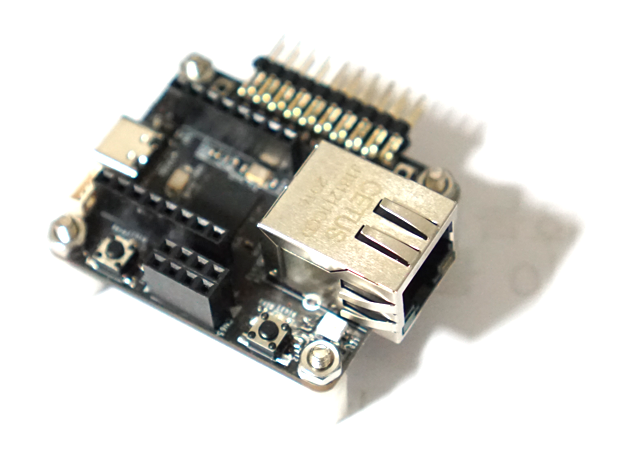
W55RP20 Arduino - Ethernet3 라이브러리를 이용한 iperf 전송률 개선 하기 에서 측정한 W55RP20의 UDP최대 전송률은 6Mbps 정도 이다. Pi Pico C/C++ SDK 환경에서 테스트 한 TCP 전송률 24Mbps와 비교하면 많이 느린것 같다.
그래서 Pi Pico C/C++ SDK를 이용하여 W55RP20의 UDP 전송률 테스트를 해보았다.
우선 UDP 루프백 테스트를 해보자
int32_t loopback_udps(uint8_t sn, uint8_t* buf, uint16_t port) {
    int32_t  ret;
    uint16_t size, sentsize;
    uint8_t  destip[4];
    uint16_t destport;

    switch (getSn_SR(sn)) {
    case SOCK_UDP :
        if ((size = getSn_RX_RSR(sn)) > 0) {
            if (size > DATA_BUF_SIZE) {
                size = DATA_BUF_SIZE;
            }
            ret = recvfrom(sn, buf, size, destip, (uint16_t*)&destport);
            if (ret <= 0) {
#ifdef _LOOPBACK_DEBUG_
                printf("%d: recvfrom error. %ld\r\n", sn, ret);
#endif
                return ret;
            }
            size = (uint16_t) ret;
            sentsize = 0;
            while (sentsize != size) {
                ret = sendto(sn, buf + sentsize, size - sentsize, destip, destport);
                if (ret < 0) {
#ifdef _LOOPBACK_DEBUG_
                    printf("%d: sendto error. %ld\r\n", sn, ret);
#endif
                    return ret;
                }
                sentsize += ret; // Don't care SOCKERR_BUSY, because it is zero.
            }
        }
        break;
    case SOCK_CLOSED:
#ifdef _LOOPBACK_DEBUG_
        //printf("%d:UDP loopback start\r\n",sn);
#endif
        if ((ret = socket(sn, Sn_MR_UDP, port, 0x00)) != sn) {
            return ret;
        }
#ifdef _LOOPBACK_DEBUG_
        printf("%d:Opened, UDP loopback, port [%d]\r\n", sn, port);
#endif
        break;
    default :
        break;
    }
    return 1;
}
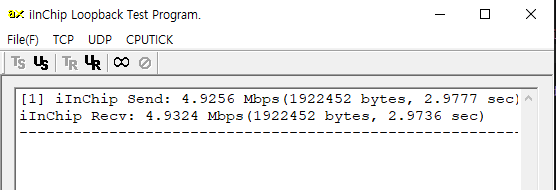
Wiznet에서 제공하는 AX 프로그램으로 UDP 송수신 루프백 테스를 해보면 5Mbps 정도로 측정된다.
양방향 이므로 단방향이면 10Mbps 정도 인데... 그래도 좀 느리다.
단방향 측정을 하는 iperf로 테스트 해보자.
UDP의 경우 단순히 전송만 하므로 iperf에서는 정확한 시간을 알수 없다. 그래서 iperf에서는 보내기만 하고 W55RP20에서 받은 데이터량과 시간을 측정해서 전송률을 계산 하도록 콛를 작성했다.
int32_t iperf_udp_rx_server(uint8_t sn, uint8_t* buf, uint16_t port) {
    int32_t  ret;
    uint16_t size;
    uint8_t  destip[4];
    uint16_t destport;

    // 속도 측정을 위한 정적(static) 변수 선언
    static absolute_time_t start_time;
    static uint64_t total_bytes = 0;
    static bool is_testing = false;

    switch (getSn_SR(sn)) {
    case SOCK_UDP :
        if ((size = getSn_RX_RSR(sn)) > 0) {
            if (size > DATA_BUF_SIZE) {
                size = DATA_BUF_SIZE;
            }

            // UDP 데이터 수신 (Loopback과 달리 데이터를 받기만 함)
            ret = recvfrom(sn, buf, size, destip, (uint16_t*)&destport);
            if (ret <= 0) {
#ifdef _LOOPBACK_DEBUG_
                printf("%d: recvfrom error. %ld\r\n", sn, ret);
#endif
                return ret;
            }

            // 첫 패킷이 들어오면 타이머 시작
            if (!is_testing) {
                start_time = get_absolute_time();
                total_bytes = 0;
                is_testing = true;
                printf("\r\n--- UDP iperf Test Started ---\r\n");
            }

            // 수신한 바이트 수 누적
            total_bytes += ret;

            // 1초(1,000,000us)마다 수신 속도 계산 및 출력
            absolute_time_t now = get_absolute_time();
            int64_t diff_us = absolute_time_diff_us(start_time, now);

            if (diff_us >= 1000000) {
                // bits per second 계산 (bytes * 8 / seconds)
                double speed_mbps = ((double)(total_bytes * 8) / ((double)diff_us / 1000000.0)) / 1000000.0;

                printf("Interval: %.2f sec | Received: %llu bytes | Throughput: %.2f Mbps\r\n",
                       (double)diff_us / 1000000.0, total_bytes, speed_mbps);

                // 다음 1초 측정을 위해 변수 초기화
                total_bytes = 0;
                start_time = now;
            }
        }
        break;

    case SOCK_CLOSED:
        // 소켓이 닫혀있으면 새로 오픈 및 변수 초기화
        is_testing = false;
        total_bytes = 0;

        if ((ret = socket(sn, Sn_MR_UDP, port, 0x00)) != sn) {
            return ret;
        }
#ifdef _LOOPBACK_DEBUG_
        printf("%d:Opened, UDP iperf Server, port [%d]\r\n", sn, port);
#endif
        break;

    default :
        break;
    }
    return 1;
}
W55RP20 에서 iperf UDP로 로 측정결과 6Mbps 정도로 측정이된다.
Arduino 환경과 동일한데...
W55RP20 Start
0:Opened, UDP iperf Server, port [5000]
--- UDP iperf Test Started ---
Interval: 1.00 sec | Received: 767330 bytes | Throughput: 6.14 Mbps
Interval: 1.00 sec | Received: 776160 bytes | Throughput: 6.21 Mbps
Interval: 1.00 sec | Received: 782040 bytes | Throughput: 6.25 Mbps
Interval: 1.00 sec | Received: 777630 bytes | Throughput: 6.22 Mbps
Interval: 1.01 sec | Received: 784980 bytes | Throughput: 6.23 Mbps
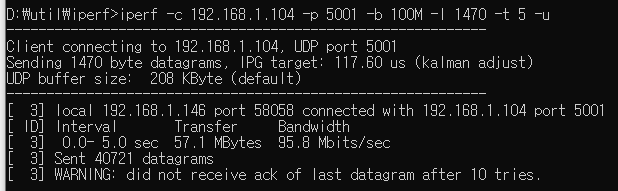
확인 결과 UDP로 전송할 때 호스트에서 최대로 전송할수 있도록 해야 최대 속도를 알수 있다고 한다.
iperf -c 192.168.1.104 -p 5001 -b 100M -l 1470 -t 5 -u
0:Opened, UDP iperf Server, port [5000]
--- UDP iperf Test Started ---
Interval: 1.00 sec | Received: 2131500 bytes | Throughput: 17.04 Mbps
Interval: 1.00 sec | Received: 2149140 bytes | Throughput: 17.19 Mbps
Interval: 1.00 sec | Received: 2149140 bytes | Throughput: 17.19 Mbps
Interval: 1.00 sec | Received: 2149140 bytes | Throughput: 17.19 Mbps
Interval: 1.00 sec | Received: 2150610 bytes | Throughput: 17.20 Mbps
iperf에서 보낼 수 있는 최대치로 전송결과 17Mbps로 측정이된다. Arduino 환경에서 동일한 조건으로 테스트 해보면 6Mbps로 측정이된다.
결론적으로 W55RP20의 최대 UDP 네트웍 성능은 Pi Pico C/C++ SDK환경에서 가능하고 17Mbps 정도가 되는것 같다.


