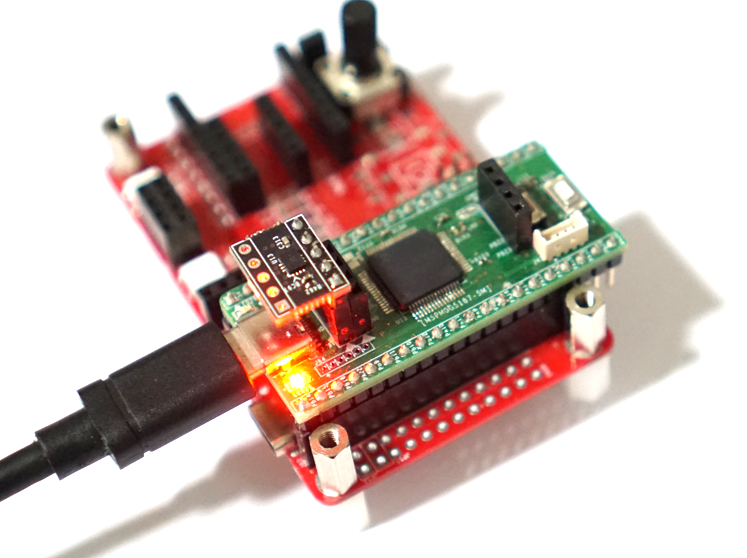
MSPM0G5187의 특징으로 USB 기능과 TinyEngine NPU 기능인데 NPU 기능을 활용하면 엣지 AI구현 할수 있다. AI 구현을 위한 첫번째 단계로 데이터 수집이므로 USB로 IMU 센서 데이터를 수집할 수 있는 코드를 작성해 보자.
MSPM0G5187 USB CDC 테스트 예제 코드와 MSPM0G5187 I2C 테스트 코드를 이용하여 IMU센서 데이터터를 수집할 수 있는 코드를 작성하자
우선 MSPM0G5187 에서 USB CDC로 printf 함수가 동작하도록 fputc, fputs 함수를 재정의 한다.
#define USB0_INST            0

int fputc(int ch, FILE *f)
{
    if ( tud_cdc_n_connected(USB0_INST) )
    {
     tud_cdc_n_write_char(USB0_INST, ch);
     tud_cdc_n_write_flush(USB0_INST);
    }

    return (ch);
}

int fputs(const char* restrict s, FILE* restrict stream)
{
    uint16_t i,len;
    len = strlen(s);

    if ( tud_cdc_n_connected(USB0_INST) )
    {
        for(i=0;i<len;i++)
        {
            tud_cdc_n_write_char(USB0_INST, s[i]);
        }

        tud_cdc_n_write_flush(USB0_INST);
    }

    return len;
}

int puts(const char* _ptr)
{
    int count = fputs(_ptr,stdout);

    count += fputs("\n",stdout);

    return count;
}
IMU 센서는 LSM6DSR 센서 모듈을 이용하고 간단히 가속도 값을 읽어 오는 함수를 작성하자.
#define LSM6DSR_ADDR        (0x6B << 1)

#define WHO_AM_I            0x0F
#define CTRL1_XL            0x10
#define CTRL2_G             0x11
#define CTRL3_C             0x12
#define CTRL4_C             0x13
#define CTRL6_C             0x15
#define CTRL7_G             0x16
#define CTRL8_XL            0x17

#define OUTX_L_G            0x22
#define OUTX_L_A            0x28


static void LSM6DSR_Write(uint8_t reg, uint8_t data)
{
    i2c_write_reg(LSM6DSR_ADDR, reg, data);
}

uint8_t LSM6DSR_Init(void)
{
    uint8_t id;

    // 1. WHO_AM_I 확인
    id = i2c_read_reg(LSM6DSR_ADDR, WHO_AM_I);

    if (id != 0x6B)return 0;  // 센서 확인 실패

    // 2. SW Reset
    LSM6DSR_Write(CTRL3_C, 0x01);
    delay_ms(50);

    // 3. Block Data Update + Auto Increment
    LSM6DSR_Write(CTRL3_C, 0x44);
    // BDU=1, IF_INC=1

    // 4. Accelerometer 설정
    // ODR=104Hz (0x40), FS=±2g (00)
    LSM6DSR_Write(CTRL1_XL, 0x40);

    // 5. Gyroscope 설정
    // ODR=104Hz (0x40), FS=2000dps (0x0C)
    LSM6DSR_Write(CTRL2_G, 0x4C);

    // 6. Gyro 필터 설정
    LSM6DSR_Write(CTRL7_G, 0x00);  // 기본 HPF off

    // 7. Accel 필터 설정 (LPF2)
    LSM6DSR_Write(CTRL8_XL, 0x09);
    // LPF2 enable + bandwidth 설정

    // 8. 추가 안정 설정
    LSM6DSR_Write(CTRL4_C, 0x00);
    LSM6DSR_Write(CTRL6_C, 0x00);

    delay_ms(10);

    return 1;  // 성공
}

typedef struct {
    int16_t ax, ay, az;
    int16_t gx, gy, gz;
} IMU_Data_t;


void LSM6DSR_Read(uint8_t addr, uint8_t reg, IMU_Data_t *imu)
{
    uint8_t buf[12];

    i2c_read_buf(addr, reg, buf, 12);

    imu->gx = (int16_t)(buf[1] << 8 | buf[0]);
    imu->gy = (int16_t)(buf[3] << 8 | buf[2]);
    imu->gz = (int16_t)(buf[5] << 8 | buf[4]);

    imu->ax = (int16_t)(buf[7] << 8 | buf[6]);
    imu->ay = (int16_t)(buf[9] << 8 | buf[8]);
    imu->az = (int16_t)(buf[11] << 8 | buf[10]);
}
이제 IMU 센서 데이터를 읽어와 USB CDC로 출력하는 예제 코드를 작성해 보자.
#include <ctype.h>
#include <stdio.h>
#include <stdlib.h>
#include <string.h>

#include "bsp/board_api.h"
#include "ti_msp_dl_config.h"
#include "tusb.h"

enum {
    BLINK_NOT_MOUNTED = 250,
    BLINK_MOUNTED     = 1000,
    BLINK_SUSPENDED   = 2500,
};

static uint32_t blink_interval_ms = BLINK_NOT_MOUNTED;

static void led_blinking_task(void);
static void USB_to_UART_task(void);

//Size of the data received via USB
#define BUFF_SIZE (64)
uint8_t gDataBuff[BUFF_SIZE];

int main(void)
{
    SYSCFG_DL_init();

    board_init();
    LSM6DSR_Init();

    // init device stack on configured roothub port
    tusb_rhport_init_t dev_init = {
        .role = TUSB_ROLE_DEVICE, .speed = TUSB_SPEED_AUTO};

    tusb_init(BOARD_TUD_RHPORT, &dev_init);

    while (1) {
        tud_task();  // tinyusb device task
        USB_to_UART_task();
        imu_read_task();
    }
}


void imu_read_task(void)
{
    static uint32_t start_ms = 0;
    static bool led_state    = false;

    if (board_millis() - start_ms < imu_interval_ms)
        return;
    start_ms += imu_interval_ms;

	LSM6DSR_Read(LSM6DSR_ADDR, OUTX_L_G, &imu_data);
    printf("%d, %d, %d\r\n", imu_data.ax, imu_data.ay, imu_data.az);
}
이제 MSPM0G5187을 이용하여 I2C 센서 데이터를 읽어오고 USB CDC를 이용하여 printf로 데이터 출력 하는 기본 코드를 작성했다. 이를 이용하여 MSPM0G5187의 TinyEngine NPU를 테스트 해 보면 좋을것 같다.


