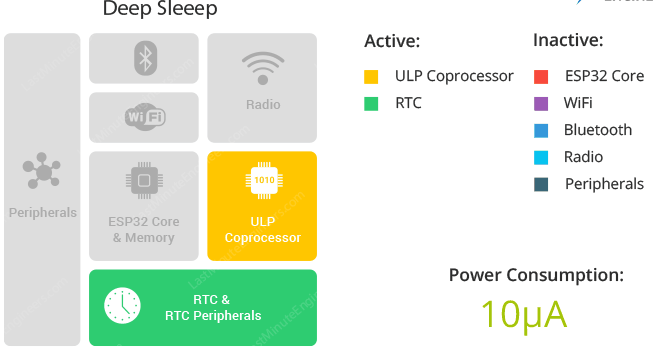
무선 솔루션에서 중요한 스펙중 하나가 저전력 구동이다. ESP32의 경우 6단계의 슬립 모드를 지원한다.

슬립모드에서 깨어 났을때 동작하고 있던 메모리의 내용이 살아 있는 Deep-Sleep 모드를 테스트 해보면 좋을것 같다.
스펙상 Deep-Sleep 모드에서 10uA 소모 한다고 한다. 이정도면 배터리 모드에서 년단위로 구도 될수 있을것 같다.
우선 가장 간단하게 부팅후 바로 슬립 모드로 들어가고 스위치를 누르면 깨어나서 내부 변수 하나를 증가시키며 다시 슬립모드로 들어가는 예제를 작성해 보자.
주요 함수로 슬립에서 깨어나는 소스 설정 함수 esp_sleep_enable_ext1_wakeup()와 슬립모드로 진입하는 esp_deep_sleep_start() 이다. 다른 MCU들의 슬립 모드 설정방법과 비교하면 아주 간단하게 함수를 작성해 둔것 같다.
#include <Arduino.h>

RTC_DATA_ATTR int bootCount = 0;
#define Sw1Pin        GPIO_NUM_27
#define LED1Pin       GPIO_NUM_4

#define Sw2Pin        GPIO_NUM_14
#define LED2Pin       GPIO_NUM_25

//슬립에서 깨어나는 방법 표시
void print_wakeup_reason(){
  esp_sleep_wakeup_cause_t wakeup_reason;

  wakeup_reason = esp_sleep_get_wakeup_cause();

  switch(wakeup_reason)
  {
    case ESP_SLEEP_WAKEUP_EXT0 : Serial.println("Wakeup caused by external signal using RTC_IO"); break;
    case ESP_SLEEP_WAKEUP_EXT1 : Serial.println("Wakeup caused by external signal using RTC_CNTL"); break;
    case ESP_SLEEP_WAKEUP_TIMER : Serial.println("Wakeup caused by timer"); break;
    case ESP_SLEEP_WAKEUP_TOUCHPAD : Serial.println("Wakeup caused by touchpad"); break;
    case ESP_SLEEP_WAKEUP_ULP : Serial.println("Wakeup caused by ULP program"); break;
    default : Serial.printf("Wakeup was not caused by deep sleep: %d\n",wakeup_reason); break;
  }
}

//GPIO wake up
void print_GPIO_wake_up(){
  int GPIO_reason = esp_sleep_get_ext1_wakeup_status();
  Serial.print("GPIO that triggered the wake up: GPIO ");
  Serial.println((log(GPIO_reason))/log(2), 0);
}

void setup(){
  pinMode(LED1Pin, OUTPUT);
  digitalWrite(LED1Pin, 1);

  pinMode(LED2Pin, OUTPUT);
  digitalWrite(LED2Pin, 0);

  Serial.begin(115200);
  delay(1000);

  //슬립모드에서 깨어나서 부팅될때 마다 카운트 값 증가
  ++bootCount;
  Serial.println("Boot number: " + String(bootCount));

  print_wakeup_reason();
  print_GPIO_wake_up();

  //wakeup 설정
  esp_sleep_enable_ext1_wakeup((1<<Sw2Pin), ESP_EXT1_WAKEUP_ALL_LOW);

  Serial.println("Going to sleep now");
  delay(1000);
  //슬립 모드 시작
  esp_deep_sleep_start();
  Serial.println("This will never be printed");
}

void loop(){

}
ESP32에서 슬립 모드 진입시 소모 전류는 8uA로 측정이 된다.

일정시간 마다 깨어나서 무선데이터를 전송하기를 원한다면 esp_sleep_enable_timer_wakeup()함수를 이용해서 깨어나는 소스를 타이머 인터럽트로 설정하면 된다. ESP32-C 슬립모드 테스트 코드를 참고.
반응형


